AI-driven inspection becomes more important when manual review no longer cuts it: too many images to check, too many repeated inspections to compare, or too much safety risk for people to inspect everything directly.
The issue is not only missed defects. It is what happens after a defect is found. Teams still need evidence, location, severity, review notes, and a repair or follow-up action. Without a shared record, inspection data turns into scattered images, spreadsheets, and reports that are hard to defend later.
AI-driven inspection turns visual or sensor evidence into defect records that teams can review, compare, and route to the next action. The system detects and classifies defects faster, while people review the findings and decide what action follows.
This guide explains how AI-driven inspection works, where it fits into the inspection workflow, and what AI adds beyond faster defect detection.
Quick Summary
- AI-driven inspection filters and classifies visual or sensor evidence, then ties suspected defects to exact asset locations.
- Capture quality, clear defect criteria, and human review determine whether the output becomes usable inspection evidence.
- A complete record keeps the evidence, severity, reviewer decision, and next action connected through reporting and repair planning.
What Does AI-Driven Inspection Actually Mean?
AI-driven inspection reviews inspection evidence, such as images, video, and sensor data, then turns possible defects into records that people can check, confirm, and act on.
Implementation examples: AI-driven inspection shows up in factories, industrial assets, buildings, and infrastructure. What changes is the input. A factory line gives the system camera images of parts, labels, welds, or finished products. Remote visual inspection gives it borescope footage from inside equipment, pipes, turbines, or confined spaces. Drone-based asset inspection gives it repeated views of bolts, fasteners, façade elevations, roof areas, corridors, units, or other inspection points.
A usable inspection record must also tie the defect to the asset or area, and gives the reviewer enough context to help actionable steps to take.
AI-Driven Inspection vs Manual and Rule-Based Inspection
The practical question is not which method is “better”; it is where the inspection bottleneck sits.
AI-driven inspection doesn’t remove the need for an inspector or reviewer. It cuts down the time and cost spent searching manually by pulling out suspected defects and tying each one to the right image, location, or asset area before a reviewer checks the result.
How AI-Driven Inspection Works
AI-driven inspection depends on how the evidence is captured, cleaned, checked, and passed into review. The model is only one part of the workflow.
1. Data Capture
A drone facade survey needs images that show cracks, stains, spalling, sealant failure, or panel damage clearly enough for review. A roof inspection needs enough overlap so seams, ponding, drains, cracks, and damaged areas are not skipped between images. A borescope inspection needs steady footage inside the equipment, because glare or shaky movement can hide corrosion, erosion, or dents.
Capture quality decides what the AI can review. If the footage is unclear, too far away, or incomplete, the model will start with bad inputs.
2. Data Filter
Blur, glare, shadows, blocked views, poor angles, and low resolution make the model read the image badly. A shadow can look like a stain. Glare can wash out a crack. A blocked view can leave part of the asset uninspected.
Those should be removed, flagged, or captured again before the model checks for defects.
3. Detect and Classify Findings
Once the input is usable, the model checks for known defect patterns: cracks, corrosion, spalling, stains, coating loss, dents, missing parts, label errors, weld issues, and surface flaws.
The model doesn’t “understand” the asset like an engineer. It compares the evidence against patterns it has learned from past examples. That is why defect criteria matter. If the team hasn’t defined what counts as minor, moderate, or severe damage, the AI output becomes harder to review.
4. Review the Result
The reviewer checks whether the model’s finding is real. False positives, unclear images, borderline severity, and odd site conditions get handled here.
The reviewer also decides whether the finding needs repair, rework, closer inspection, or no action.
5. Turn the Finding Into a Report or Action
After review, the finding moves out of the inspection stage and into the team’s work system: a report, repair plan, work order, quality log, maintenance record, or audit trail.
AI-Driven Inspection Output Checklist
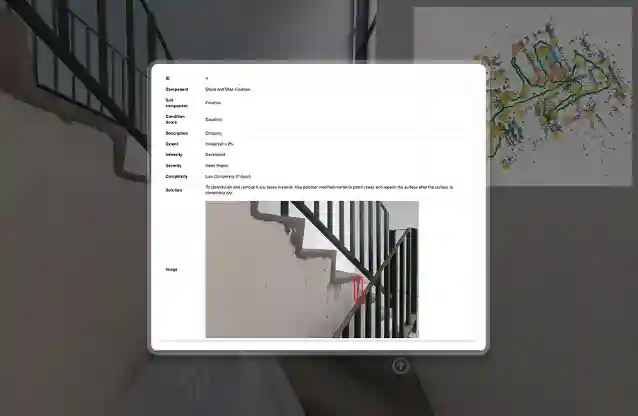
AI-driven inspection output should not stop at a marked defect. The reviewer still needs the source image, exact location, severity note, and follow-up item in the same record.
This is where an AI inspection platform comes in. The image, location, severity, review status, and follow-up item should stay connected in one platform from the first finding to the final report.
Where AI-Driven Inspection Is Used
AI-driven inspection is commonly implemented where manual review gets buried in repeated images, unsafe access, data or evidence spread across many products, rooms, sites, or assets.
What AI-Driven Inspection Needs Before It Works
A model cannot fix a vague inspection brief. Before AI is added, the team has to decide what is being inspected, which defects count, how severity is graded, and who checks the result.
Loose setup creates bad inspection output even when AI is implemented: wrong flags, missed defects, unclear severity, and findings inspectors cannot accept or reject with confidence.
How to Evaluate an AI-Driven Inspection Solution
A demo model is not enough. The real question is whether the system holds up inside your own inspection process.
Test it with messy samples from past inspections: clear defects, borderline damage, poor angles, repeated areas, clean surfaces that should not be flagged, and cases your team has already debated. A useful evaluation shows where the system is accurate, where it breaks, and what still needs a human call before live use.
Conclusion
AI-driven inspection matters because inspection work doesn’t end once data are captured. The difficult part is carrying each finding through review, reporting, repair planning, and later questions about why a decision was made.
The system still needs clear defect criteria, usable capture, and human review. Without that setup, AI becomes another layer of flags for the team to clean up.
For building, facility, and asset teams, H3 Zoom’s inspection intelligence platform is built around that handoff. It keeps inspection images, mapped findings, review status, and report outputs connected, so the record stays usable for repair planning, follow-up, and defensible inspection decisions.